

←/→ wherever the selection is, or
click one. What your agents said is in the Feed, a pane of its own beside the
session (f).
Every start opens the Status tab. Filters only narrow what one window shows, and aren’t saved.
Status
A header per state, in the order you need them:
Ready is sorted by when you last read each session, most recent first, under sub-headers a
column in: last hour, last day and older. Reading an unread reply moves the
session to the top of Ready, and sessions move down the periods as time passes. A session you select
stays shown when its status changes, until you select another.
Folders
A header per folder, with its name, git branch and how many of its sessions are running (live/total), even when there’s only one folder. The folder you started Rakumux in comes first, then the others by name.{ and } jump between folders.
Inside a folder, sessions whose agent works in a linked git worktree are listed under that
worktree’s own header, with its path and branch, after the folder’s own sessions. A session moves
between these sections as its agent changes worktree. Enter on a folder’s or worktree’s header
starts a new session there.
App
A header per agent or program: claude, codex, opencode and other agents first, then other programs, then shell. Each is listed with how many of its sessions are running.Where each session has worked
Under every session’s name and app, one line shows where it works now: its worktree or folder (its path in the session’s folder), then its repository and branch (worktrees/auth web ⎇ feat/auth).
It follows the agent: when the agent moves into a worktree, so does the session’s place, even before
it changes anything there.
When the agent has changed files in other git checkouts or worktrees too, ▸ sits left of that
line. w opens them under the selected session (W opens every session’s), as does a click on
▸; ▾ closes them again. Each sits a step further in, under a rule: its path, then its branch
and how long ago the session worked there, most recent first. Folders the agent only started in or
read from aren’t listed, and places outside the session’s folder show their path from your home
(~/code/api).
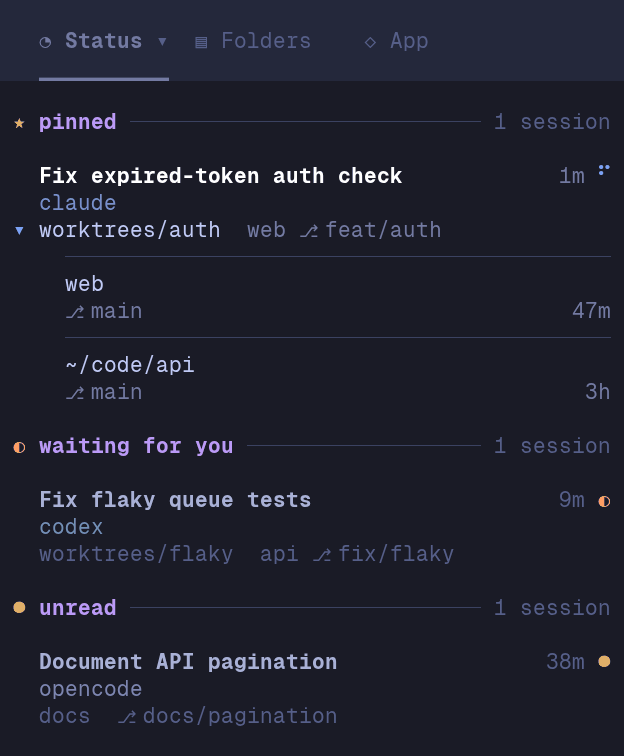
↓/↑ step through them as if each were a row, and y copies the path of the
one you’re on (else of where the session works now) to your clipboard, in terminals that let
programs set it. A click on a place copies
its path without selecting the session. Places are read on your machine from what the agent did
(Claude Code, Codex and OpenCode), and kept with the session, so an ended session keeps its own.
They need Rakumux 0.1.23 or later.
Filter a tab
Enter on the active tab, or a click on it, opens its modal: Statuses, Folders or Apps.
Each tab keeps its own filter while another is active.
P opens the Folders modal from any tab.
Add a folder
In the Folders modal, type a folder path (starting with/, ~ or ., or containing a /) and it’s
offered as + Add folder, with the folders that complete it listed below. ↑/↓ choose one,
Tab (or → at the end of the path) completes it, and Enter adds the folder and shows it, ready
for new sessions. A folder that doesn’t exist yet is offered as + Create folder, created after you
confirm with y. To forget a folder that has no sessions, use rakumux folders rm <dir>.
Filter by text
/ narrows the list to the sessions matching what you type. ↑/↓ select among the matches,
Enter keeps the filter so the list keys work again, and Esc clears it.
Order within a header
Under every tab, pinned sessions lead, then the order you gave them, then the rest. Drag a session or pressJ/K to move it within its header; it never moves into another header. Each tab keeps its
own order. Ready is the exception: it’s always sorted by when you read each session.